I still have faint, lingering nightmares about the Pen Tool in Photoshop. Hours, I tell you, hours spent meticulously clicking around a product or a person, zooming in until the pixels were the size of dinner plates, just to get a clean cutout. My wrist would ache. My eyes would burn. It was a rite of passage for anyone in digital marketing or design a decade ago. We’d complain, but we did it because we had to.
Then, AI tools started popping up, whispering sweet promises of one-click solutions and effortless editing. Some were... well, let's just say they were more 'artificial' than 'intelligent'. But the tech has been getting scarily good, scarily fast. And that brings me to the platform I’ve been playing around with lately: Cutout.Pro. It bills itself as an all-in-one AI visual design platform, and honestly, the claim isn't far off. But is it just another shiny object, or is it a genuinely useful tool for those of us in the trenches of content creation and SEO? Let’s find out.
What Exactly is Cutout.Pro Anyway?
Think of Cutout.Pro as a digital Swiss Army knife for your images and videos. Instead of having a dozen different apps or browser tabs open—one for removing backgrounds, one for upscaling low-res images, another for generating some AI art for a blog post—Cutout.Pro aims to house all that under one roof. It’s built on a foundation of AI that automates all those tedious tasks I used to lose my weekends to.
At its core, it’s designed for speed and efficiency. Whether you're an e-commerce store owner who needs 100 product photos with clean white backgrounds by tomorrow, a blogger who needs a compelling featured image right now, or even a developer looking to integrate these features into your own app, it seems to have a solution. Its a pretty broad audience, which can sometimes mean a tool is a master of none. I was skeptical, I admit.
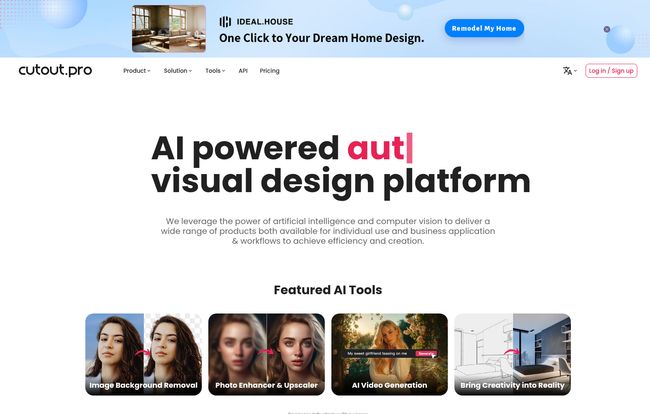
Visit Cutout.Pro
My Favorite Cutout.Pro Features Put to the Test
An impressive list of features is one thing, but performance is another. I decided to throw a few of my own common, real-world tasks at it to see how it held up.
The Magic Wand for Backgrounds (And Unwanted Exes)
Let's start with the headliner: background removal. This is the bread and butter of so many visual AI tools. I uploaded a few tricky product shots—some with complex edges, others with busy backgrounds. The image background remover is shockingly fast. In most cases, it produced a clean, usable PNG in seconds. It even handles notoriously difficult subjects like frizzy hair or fuzzy sweaters with surprising accuracy.
But the real fun is the Object Removal tool. We've all been there. You have the perfect group photo, but there's a random tourist in the background, or maybe an ex-partner you'd rather digitally erase from history. I tested this on a vacation photo with a stray trash can ruining the vibe. I painted over the can, hit go, and... poof. It was gone. The AI did a decent job of filling in the background. It’s not always flawless—complex backgrounds can sometimes result in a slightly blurry patch—but for social media and general use, it's a lifesaver.
Breathing New Life into Old Photos
This part felt a bit like magic. I have a box of old family photos, many of them faded, some a bit blurry. I scanned a grainy black-and-white picture of my grandparents from the 60s and ran it through the Photo Enhancer and Photo Colorizer.
"The results were genuinely moving. The enhancer sharpened their faces without looking artificial, and the colorizer added a layer of realism that made it feel like the photo was taken yesterday. It’s not just a technical tool; it’s a way to reconnect with memories."
This is where I see a ton of value beyond just marketing. It can restore cherished memories, which is a powerful feature that's easy to overlook when you're just focused on business applications.
The AI Creative Playground
Okay, now for the fun stuff. The AI Art Generator and Cartoon Selfie tools. I know, I know, the internet is awash with AI-generated images, and there's a whole ethical debate there (a topic for another day!). But for creating a quick, unique blog header or a funky social media avatar, these tools are brilliant. I typed in a prompt like, "a fox in a library reading a book, impressionist oil painting style," and got a few really cool options in under a minute. It's perfect for when you need a visual and stock photos just feel too... stock.
The Cartoon Selfie is more of a novelty, but a fun one. It turns your photo into various animation styles. Not something I'd use daily, but it shows the breadth of the platform.
Who is This Tool Actually For?
After messing around with all the features, I've got a pretty good idea of who gets the most bang for their buck here.
- The E-commerce Hustler: This is a no-brainer. The ability to batch-process product photos, remove backgrounds, and create clean, consistent imagery for your store is a massive time and money saver. No more hiring a freelancer for every new product batch.
- The Busy Marketer and Blogger: That's me. Creating graphics for blog posts, social media, and ads is a constant demand. Cutout.Pro lets me create or enhance images quickly without needing to be a Photoshop wizard. This directly impacts things like user engagement and click-through rates. Better visuals often mean better traffic.
- The Developer: This is the sleeper agent feature. Cutout.Pro offers an API. This means a developer can build these AI tools directly into their own website or application. Imagine an online marketplace where users can automatically clean up their profile pictures, or a print-on-demand service where backgrounds are removed on the fly. This elevates it from a simple tool to a platform solution.
The Good, The Bad, and The AI
Alright, let's get down to brass tacks. No tool is perfect, and it's important to see both sides of the coin.
The Good Stuff
First off, the sheer convenience is undeniable. Having this many tools in one place is fantastic. It saves a ton of time and mental energy. The user interface is clean and intuitive; you dont need a degree in graphic design to figure it out. For the most part, the quality of the output is high, especially for common tasks like background removal and image enhancement. And the API is a professional-grade feature that sets it apart from many consumer-level apps.
The Not-So-Good Stuff
Let’s be real. Relying entirely on AI means giving up a degree of creative control. A professional designer using Photoshop can make micro-adjustments that AI might miss. Secondly, the results can sometimes be a bit of an “AI lottery.” 90% of the time, it's brilliant. But that other 10%? You might get a weird artifact or a slightly botched background fill that requires a do-over or a manual touch-up. Finally, this power isn't entirely free. To get full access and process images in high resolution, you'll likely need a subscription.
What About the Price Tag?
This is always the big question, isn't it? Cutout.Pro generally operates on a credit-based or subscription model. You pay for a certain number of credits per month, with different tasks costing different amounts of credits. For example, a standard-definition background removal might cost one credit, while upscaling an image to 4k might cost more.
They do offer a few free credits when you sign up, so you can test drive the platform without pulling out your credit card, which I always appreciate. Because pricing plans can change, I won't list the exact numbers here. Your best bet is to head directly to the Cutout.Pro pricing page to see the latest plans and find one that fits your usage needs. For a business, the cost is often easily justified by the time saved. For a casual user, you'd have to weigh how often you'd actually use it.
Frequently Asked Questions about Cutout.Pro
Can Cutout.Pro really handle video background removal?
Yes, it can. The process is similar to image background removal but applied to every frame of the video. It's more resource-intensive and may take longer, but it's a powerful feature for creating professional-looking videos without a physical green screen.
Is the AI Art Generator good enough for commercial use?
This is a gray area in the world of AI art. While the tool can create amazing images, the legalities of copyright for AI-generated art are still being established. For internal presentations, blog posts, or social media, it's generally fine. If you're planning to use an image for a major commercial campaign or as a logo, you should consult the platform's terms of service and potentially seek legal advice.
Do I need to be a designer to use Cutout.Pro?
Absolutely not. That's the whole point! The platform is designed for simplicity. If you can upload a photo and click a button, you can use Cutout.Pro. It democratizes design tasks that were previously locked behind complex software.
How does the API integration work?
For developers, Cutout.Pro provides API keys that allow you to send requests from your own code to their servers. For instance, your app could send an image and receive the same image back with the background removed. Their website has detailed documentation for developers to get started.
Is Cutout.Pro better than Canva or Photoshop?
They serve different purposes. Photoshop is the undisputed king of manual, detailed photo manipulation. Canva is a template-based design platform for creating full layouts (like social media posts or presentations). Cutout.Pro specializes in AI-powered processing and automation. It's less a competitor and more a complementary tool. You might use Cutout.Pro to prepare an image (e.g., remove the background) and then import it into Canva to finish your design.
Are there any free features on Cutout.Pro?
Yes, upon signing up, you typically receive some free credits to try out the various tools. This allows you to process a few images or short videos for free to see if the quality meets your needs before committing to a paid plan.
My Final Verdict
So, is Cutout.Pro the design assistant I've been waiting for? For a huge chunk of my daily work, the answer is a resounding yes. It's not going to replace the nuanced eye of a human artist or a seasoned graphic designer. But it’s not trying to. It’s a force multiplier. It takes the 80% of design work that is repetitive and tedious and automates it, freeing you up to focus on strategy, creativity, and the bigger picture.
It has officially earned a spot in my digital toolbox. It's a powerful, versatile, and—most importantly—time-saving platform that I can see myself using for years to come. If you've ever found yourself cursing at the Pen Tool, you owe it to yourself to at least give the free trial a spin. You might just get a few hours of your life back.
Reference and Sources
- The official Cutout.Pro Website: https://www.cutout.pro/
- Cutout.Pro Pricing Page: https://www.cutout.pro/pricing
- An interesting take on the rise of AI in creative fields from TechCrunch: The generative AI revolution is just getting started