Let’s have a little heart-to-heart. Open a new tab and look at your YouTube “Watch Later” list. Go on, I’ll wait. Is it a pristine, curated collection of five or six videos? Or does it look more like mine—a digital graveyard where good intentions and fascinating video thumbnails go to die? Yeah, I thought so.
We’re all drowning in content. Every day, there's a new must-watch conference talk, a deep-dive tutorial, or a podcast interview with an industry titan. I’ve always felt this tension between the thirst for knowledge and the brutal reality of the clock. A two-hour video might have ten minutes of pure genius, but finding it feels like panning for gold in a river of fluff. So when I heard about a tool called You-TLDR, my inner, time-starved SEO geek sat up and paid attention. Another AI tool promising the world? Maybe. But what if it could actually deliver me from my content purgatory?
I decided to take it for a spin, not just as a user, but as a content professional who lives and breathes traffic, engagement, and efficiency. So here’s my no-nonsense take on whether You-TLDR is the real deal.
So, What Exactly is You-TLDR?
Think of it as the ultimate cheat sheet for YouTube. The name itself is a classic internet acronym: “Too Long; Didn’t Read.” And that’s precisely the problem it solves, but for video. At its core, You-TLDR ingests any YouTube video and spits out the important bits. It’s a summarizer, a transcriber, a search engine for video content, and a whole lot more, all rolled into one surprisingly clean interface.
The promise is simple: paste a YouTube link, and in seconds, get the key insights. No more scrubbing through timelines trying to find that one point someone made. Sounds pretty good, right?
Visit you-tldr
First Impressions: Does it Pass the Smell Test?
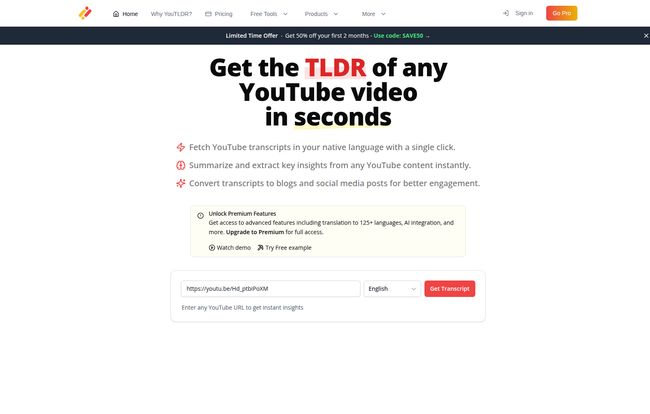
My first test was a 50-minute video from a recent marketing conference. I just didn't have the time but I knew there were some nuggets in there. I grabbed the URL, popped it into the You-TLDR homepage, selected English, and hit “Get Transcript.”
It was fast. Like, scary fast. Within seconds, I had a full, time-stamped transcript. But the summary was the main event. The AI generated a concise overview of the entire talk, broken down into key topics. I could immediately see the main arguments without having to listen to the speaker’s rambling intro about the terrible hotel coffee. It's like having a research assistant who's mainlined the entire video and is ready for a debrief. A pretty powerful first impression.
The Standout Features for Marketers and Creators
Okay, a summary is cool. But for a tool to earn a spot in my bookmark bar, it needs to do more. And this is where You-TLDR started to genuinely impress me. It’s not just a time-saver; it’s a content multiplier.
Content Repurposing on Autopilot? Not Quite, But Close.
This is the big one for my fellow SEOs and content folks. You-TLDR has dedicated functions to convert a video into a blog post, a LinkedIn article, or a Twitter thread. I tested this with a video about Google's latest algorithm updates. The “Video to Blog” output was… surprisingly solid. It wasn't a perfectly polished, ready-to-publish article, let's be real. It needed a human touch, some added perspective, and my own voice. But it gave me a structured, well-organized draft with all the key points, quotes, and data from the video. It turned a 3-hour writing job into a 45-minute editing and polishing job. That’s a massive win.
Turning a long-form video into a punchy Twitter thread used to be a pain. This feature lays it all out for you, tweet by tweet. Again, you'll want to tweak the wording, but the heavy lifting is done. From an efficiency standpoint, this is just fantastic.
The Interactive Chatbot is Your Personal Video Tutor
Here’s something I didn’t know I needed. After summarizing a video, you can literally ask the video questions. I was watching a complex tutorial on setting up GA4 server-side tagging and got a bit lost. Instead of re-watching a 15-minute segment, I just typed into the chat: “What did he say about creating a new tag in GTM?” And boom, it pulled the exact explanation from the transcript and presented it to me. This transforms passive watching into an active learning session. It’s brilliant for technical tutorials or dense, academic lectures.
Transcripts and Search: The Unsung Heroes
Never underestimate the power of a good transcript. Being able to download a full, clean transcript is a godsend for quoting sources, pulling stats for an article, or just having a written record. Even better is the search function. You can search the entire video for a specific keyword or phrase and it will instantly jump you to every timestamp where it's mentioned. No more endless scrubbing! This alone has probably saved me hours already.
Who is This Tool Really For?
While I think almost anyone could find a use for it, a few groups will see a massive return on their investment.
- Content Creators & Marketers: This is a no-brainer. The ability to mine your own (or your competitors') video content and repurpose it across platforms is insanely valuable. It helps you maximize your reach with a fraction of the effort.
- Students & Researchers: Imagine turning a 3-hour university lecture into a summarized study guide with a searchable transcript. Or getting the essence of a dense documentary in minutes. It's an academic superpower.
- The Chronically Curious: If you're like me, with a passion for learning but a deficit of time, this tool lets you consume more knowledge, faster. It helps you decide which videos are truly worth your undivided attention.
Let's Talk Money: The You-TLDR Pricing
Alright, the all-important question: what’s the damage? You-TLDR does have some basic functionality for free, but all the powerful features I've been talking about—the advanced AI summary, content repurposing, and the Q&A bot—are part of their Premium Plan.
The standard price is $19 per month. Right now, it looks like they have an offer for $9.50 per month for the first two months. So, is it worth it? In my opinion, yes, if you fall into one of those user groups above. Think about it: my hourly consulting rate is way more than $19. If this tool saves me even one hour of work a month (and it easily saves me 5-10), it's already paid for itself. For a busy professional, the ROI is ridiculously clear.
The Not-So-Shiny Parts: A Reality Check
No tool is perfect, and it’s important to be honest about the downsides. You-TLDR is powerful, but it's not magic.
First, the AI isn't a mind reader. The quality of the summary is directly proportional to the quality of the source video. If the video is a rambling, unstructured mess with poor audio, the summary will reflect that. Garbage in, garbage out, as they say. Second, a lot of the best features are locked behind that premium paywall. This is pretty standard for SaaS products, but you need to be willing to pay to get the real power.
So, What's the Final Word?
I came in skeptical and I'm walking away a convert. You-TLDR isn't just another shiny object. It’s a practical, powerful tool that solves a very real problem for a lot of people. It’s helped me clear my 'Watch Later' backlog, speed up my research process, and given me a killer new workflow for content repurposing.
It won't replace the need to watch truly important videos in full. But for everything else? For getting the gist, for finding that one key insight, for turning a single piece of content into a multi-platform campaign? It's become my new secret weapon. That graveyard of good intentions on my YouTube account is finally getting cleaned up.
Frequently Asked Questions
- Is You-TLDR free to use?
- There is a basic free version, but most of the powerful features like advanced summarization, content repurposing, and the interactive chatbot require the Premium subscription.
- How accurate are the AI summaries?
- They're generally very good, especially for well-structured videos with clear audio. Think of them as an excellent first draft or a detailed executive summary. It's always a good practice to cross-reference with the transcript for critical details.
- What kind of videos does it work on?
- It works on pretty much any public YouTube video. Its effectiveness is highest on videos where people are speaking clearly, like interviews, tutorials, lectures, and presentations.
- How many languages does You-TLDR support?
- The premium plan supports summarization and translation for over 100 languages, which is a huge benefit for global teams and non-native English speakers.
- Is there a money-back guarantee?
- Yes, the website states that all plans come with a 30-day money-back guarantee, so you can try out the premium features with less risk.
Reference and Sources
- You-TLDR Official Pricing Page
- The Ultimate Guide to Content Repurposing by HubSpot
- Information Overload and the Brain via Psychology Today