If your browser looks anything like mine most days, it’s a chaotic mess of good intentions. A graveyard of tabs. You’ve got that deep-dive on the latest Google algorithm update, a long-read from The Atlantic you swear you'll get to, three different articles about the future of programmatic advertising, and that one recipe for sourdough you opened six weeks ago. We’re all drowning in a digital content firehose, and most of us don't even have a bucket.
As someone who lives and breathes SEO and content, my job is literally to add to this firehose. The irony is not lost on me. I spend my days creating long-form, valuable content and my nights trying to find shortcuts to consume everyone else's. So, when a tool pops up with a name as beautifully blunt as tl;dr, my ears perk up. It’s the internet's most famous acronym, now reincarnated as an AI-powered summarizer. But is it any good? Or is it just another piece of digital clutter?
So What Exactly is tl;dr?
In the simplest terms, tl;dr is a web extension that acts like a super-smart, incredibly fast intern. You land on a web article, click a button, and it uses an LLM (Large Language Model – the same kind of brain behind tools like ChatGPT) to read the entire thing and spit out a neat summary in a few bullet points. The whole point is to give you the core message without you having to wade through 2,000 words of fluff, ads, and rambling introductions. You know, kind of like the one I just wrote. See? The irony continues.
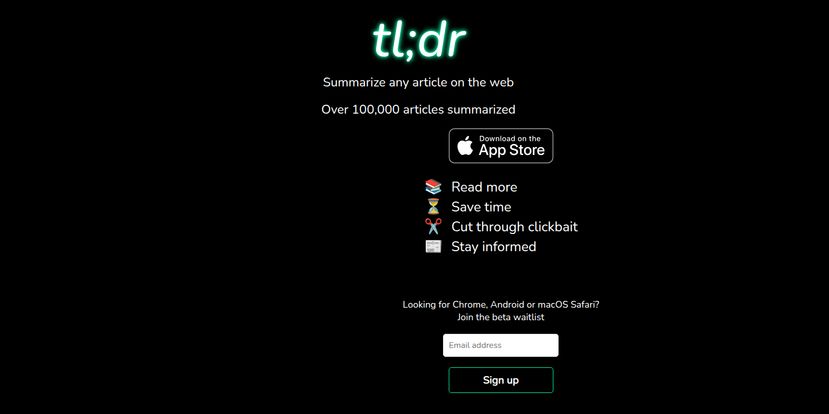
The promise is huge: Read more, save time, cut through clickbait, stay informed. For anyone whose career depends on knowing things, that’s not just a feature list; it’s a mantra.
Visit tl;dr AI
Putting It To The Test: My First Impressions
Getting started is, in theory, straightforward. For iPhone and iPad users, it’s right there on the App Store. For the rest of us on Chrome, Android or macOS Safari, it’s currently a beta waitlist situation. I popped my email in, because of course I did. The idea of this tool is just too tempting.
Once you have it, the magic happens. You’re on a page, you feel the familiar dread of the scrollbar of doom, and instead you just… click. And voilà. A neat little overlay appears with the key takeaways. It feels a bit like having a cheat code for the internet. It’s a content cocktail strainer, separating the delicious, knowledge-filled juice from the pulpy mess of filler words and SEO padding. Suddenly, you can triage your reading list in minutes, not hours.
The Good, The Bad, and The AI-Generated
No tool is perfect, especially one that relies on the still-developing world of AI. After playing around with similar tools and looking at what tl;dr promises, here’s my breakdown.
The Big Wins
The time-saving aspect is, without a doubt, the number one reason to even consider this. You can get the gist of ten industry articles in the time it used to take you to read one. For staying on top of trends, that’s massive. And its ability to slice right through clickbait is a thing of beauty. No more getting suckered into a slideshow listicle that takes 15 clicks to reveal something you could have googled. It tells you upfront if the article is actually worth your attention. It’s like having a friend who has already read the article and tells you, “Nah, skip it, it’s mostly fluff.”
Where It Gets a Little Murky
On the flip side, you have to remember that you're getting an AI's interpretation. And AI, for all its smarts, is not human. It doesn't get sarcasm all teh time, and it can miss the subtle nuance or emotional weight of a well-crafted story. If you’re reading a highly technical whitepaper or a beautifully written opinion piece, a bullet-point summary is going to strip out the very things that make it special. The summary's quality is entirely dependent on the LLM's ability to 'understand' the source material, and we all know that can be a bit of a coin toss sometimes.
Plus, some people just have an aversion to installing more browser extensions. I get it. Each one is another piece of code running on your machine, another potential privacy concern. You have to decide if the trade-off is worth it.
Who Is This Tool Actually For?
I can see a few groups getting a ton of value out of tl;dr. First, students. Absolutely. When you're facing a mountain of research papers, being able to quickly vet sources for relevance would be incredible. Second, professionals like me—marketers, journalists, analysts, developers—who need to stay current but are perpetually short on time. It's a fantastic tool for daily news consumption and competitive research.
Even casual readers could benefit. Ever clicked a link from social media, only to find the actual point is buried in paragraph eleven? Problem solved. It’s for the impatient, the busy, and the curious. It’s not for someone looking to relax with a long, immersive essay on a Sunday afternoon. It's a productivity tool, not a replacement for the joy of reading.
The All-Important Question: What's the Price?
This is the million-dollar question, isn't it? As of right now, there’s no clear pricing on their landing page. The existence of an App Store link and a beta waitlist suggests it might be free during this growth phase, or they might be planning a freemium model down the line. My gut tells me we'll see a free version with a limited number of summaries per day, and a paid tier for power users. For now, getting on that waitlist is your best bet to try it out, presumably for free.
A Quick Word for My Fellow Content Creators
Does a tool like this terrify me? A little! Does it mean people will stop reading the articles we spend so much time writing? I don't think so. In my view, tools like tl;dr don't kill long-form content; they raise the bar for it. It's a filter. If your article can be perfectly condensed into three bullet points with nothing lost, maybe it wasn't a very compelling article to begin with. This pushes us to create more engaging, story-driven, and genuinely valuable content that people want to read in its entirety, not just skim for the highlights.
Frequently Asked Questions
- How does tl;dr AI actually work?
- It uses a Large Language Model (LLM) to analyze the text of a webpage and generate a concise summary, usually in bullet points, which it then displays on the page for you.
- Is the tl;dr summary tool free to use?
- Currently, there is no public pricing. It appears to be in a free beta phase. You can download it from the iOS App Store or join a waitlist for other platforms like Chrome.
- What browsers and devices does tl;dr support?
- It's available as an app for iOS (iPhone/iPad). There is a beta waitlist for a Google Chrome extension, Android, and a macOS Safari version.
- Can an AI summary really replace reading the full article?
- No, and it's not meant to. Think of it as a tool for triage—helping you decide if an article is worth your time. For deep understanding, nuance, or enjoyment, you still need to read the full text.
- Is it safe to install the tl;dr browser extension?
- As with any browser extension, it's wise to be cautious. Always download from official sources like the Chrome Web Store or the company's website. Before installing, check the permissions it asks for to ensure they make sense for what the tool does.
Final Thoughts: Is tl;dr Worth Your Click?
So, here's my final take. tl;dr isn't some magical solution that will add more hours to your day. But it is a very clever, very practical tool for managing the digital noise. It’s a dam against the content firehose. It won't stop the water, but it gives you a lever to control the flow.
For the grand price of a spot on a waitlist, it’s absolutely worth a shot. It might just save you a few hours a week and a lot of frustration. And in the battle for our attention, having a smart filter on your side is a pretty powerful weapon.
References and Sources
- tl;dr Official Website: The primary source for the app download and beta waitlist, as seen in the provided information.
- App Store: tl;dr on the Apple App Store
- Article on Information Overload: For further reading on the problem tools like this aim to solve, check out Harvard Business Review's take on "Death by Information Overload."