We've all been there. You launch a new product or service, and suddenly your inbox looks like a crime scene. The same questions, over and over. So you do the responsible thing: you create an FAQ page. A week later, it's already out of date, buried somewhere on your site, and your team is still answering the same questions on Slack, in emails, and probably in their sleep.
The whole process of creating and maintaining a good help center or knowledge base is... a grind. It’s one of those tasks that’s always important but never quite urgent enough. Until it is.
So, when I see a tool like Siedesk pop up, claiming to be an “all-in-one” solution with AI assistance, my professional curiosity gets the better of me. Another AI tool, you say? Groundbreaking. But this one felt a bit different. It’s not just about writing blog posts; it’s about creating a core business asset: a knowledge base. For your customers and your team. I had to see if it lived up to the hype.
So, What Exactly Is Siedesk Anyway?
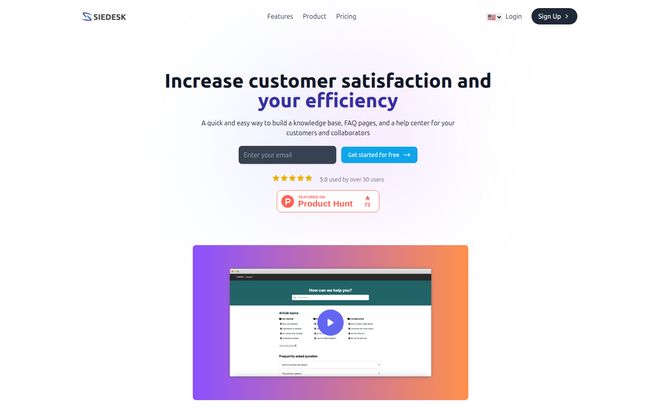
In simple terms, Siedesk is a platform designed to help you build a help center. Think of it as the ultimate digital librarian for your business. It’s a single place to create, manage, and publish articles that answer your customers' most pressing questions (your External Knowledge Base) and to document all your internal processes for your own team (your Internal Knowledge Base).
It’s not trying to be your all-singing, all-dancing CRM with live chat and a million other bells and whistles. And honestly? I respect that. It focuses on one thing—knowledge management—and aims to do it really well. It bundles in an AI writer, SEO features, and performance tracking to make that single job easier and more effective. A focused tool in a world of feature-bloat. I’m already intrigued.
The Features That Actually Matter
Okay, let's get into the nitty-gritty. A features list is just a list until you see how it solves a real problem. Here’s my take on what Siedesk brings to the table.
The AI Assistant: A Ghostwriter or a Gimmick?
The headline feature is, of course, “Writing with GPT.” As an SEO, I have a... complicated relationship with AI content. It can be a fantastic accelerator or it can pump out soulless, generic fluff that Google’s helpful content updates will gobble up for breakfast. So, how does Siedesk’s implementation stack up?
I see it as a powerful brainstorming partner and a first-draft machine. It’s brilliant for overcoming that dreaded blank-page-syndrome. You can feed it a prompt like “How to reset your password,” and it will generate a clear, structured article in seconds. Is it perfect? No. You still need a human to come in, inject your brand's voice, add some nuance, and check it for accuracy. But it gets you 80% of the way there in 10% of the time. Think of it less as a self-driving car and more as an advanced cruise control system. You still need to keep your hands on the wheel, but the journey is a whole lot smoother.
Visit Siedesk
Internal vs. External: Finally, One Home for All Your Knowledge
This is quietly one of the most brilliant parts of the platform. Most companies I've worked with have two completely separate, and equally messy, systems. Customer help docs are in one place (if they're lucky), while internal training guides, SOPs, and company policies are scattered across Google Docs, Notion pages, and that one super-long Slack thread you can never find.
Siedesk combines them. Your support team can access the same knowledge base as your customers, but with additional internal-only articles. This is huge. It means your support agents are always working from the most up-to-date information, the same information the customer is seeing. It creates consistency and dramatically speeds up onboarding for new hires. No more asking, “Hey, where’s that doc on how we handle refunds again?” It’s all there.
SEO Optimization & Custom Domains: The Stuff I Live For
Okay, my SEO heart is beating a little faster now. Any platform that takes this seriously gets bonus points from me. Siedesk lets you host your help center on a custom domain (e.g., help.yourwebsite.com). This is non-negotiable for serious businesses. It builds brand trust and, more importantly, all the SEO authority you build with your helpful content stays with your domain.
They also throw in a free SSL certificate, which is table stakes these days but great that you don't have to worry about it. The “SEO-Friendly” promise suggests the platform generates clean code and allows for the basic on-page optimizations needed to rank. A well-structured knowledge base can be an absolute traffic goldmine, attracting long-tail keyword searches from people with high purchase intent. This feature is not just a perk; it's a growth strategy.
Performance Tracking: Are You Shouting into the Void?
Ever spend a week crafting the “perfect” help document only to wonder if anyone ever read it? Siedesk’s analytics helps solve that. You can track views, searches within the help center, and even article feedback (likes and dislikes). This is a simple but powerful feedback loop. You can see what articles are popular, what terms people are searching for (and not finding!), and which articles are genuinely helpful. This data is pure gold for your content and product teams. It tells you exactly where your customers are struggling and where your documentation is falling short.
Let's Talk Money: The Siedesk Pricing Plans
Alright, the all-important question: what's this going to cost? The pricing structure is refreshingly straightforward, broken into three tiers. They also offer a 20% discount if you pay annually, which is a nice touch.
| Plan | Price (Monthly) | Who It's For |
|---|---|---|
| Starter | $9.99 /mo | Solo founders, small startups, or anyone needing one public and one internal workspace. An absolute steal for the price. |
| Business | $24.99 /mo | The sweet spot for most growing SMBs. Supports 5 team members and gives you more public workspaces for different products or brands. |
| Serial | $99.99 /mo | For larger companies, agencies, or serial entrepreneurs managing a portfolio of projects. Supports 20 team members and 10 public workspaces. |
My take? The value here is excellent. The Starter plan at $9.99 is almost a no-brainer. For less than the cost of a Netflix subscription, you get a fully functional, AI-assisted, SEO-ready help center. The scaling makes sense, and you're not getting nickel-and-dimed for core features. Every plan includes the AI writing, SSL, SEO, and custom domain.
The Good, The Bad, and The Things to Consider
No tool is perfect, and a good review is an honest one. I've been singing Siedesk's praises, but there are a few things to keep in mind.
On the plus side, the user interface is clean and easy to get the hang of. The AI assistance is a genuine time-saver, and the combination of internal and external bases in one platform is a killer feature. The pricing is very competitive.
On the other hand, the information on specific third-party integrations seems a bit limited right now. I'd love to see direct connections with platforms like Slack or Jira down the road. This isn't a dealbreaker—you can always link out—but tighter integration would be the cherry on top. Also, while the pricing is great, some might wish for a barebones free plan just to kick the tires indefinitely. The “Get Started for Free” buttons suggest a free trial is available, which is the next best thing.
My Final Verdict: Is Siedesk Worth It?
So, after digging in, what's the final word? I'm genuinely impressed. Siedesk isn't trying to change the world with some abstract new technology. It's taking a very real, very common business headache and applying modern tools to solve it elegantly and affordably.
It’s for the startup founder wearing ten hats who needs a professional help center yesterday. It's for the support manager who wants to empower their team and reduce repetitive tickets. And it's for the savvy marketer or SEO who recognizes a well-tended knowledge base is one of the best, most underrated ways to drive organic traffic and build topical authority.
It’s not magic. You still need to have a strategy and put in the work. But Siedesk acts as a massive force multiplier, making the whole process faster, smarter, and more organized. For the price, especially on that Starter plan, it’s one of the best value propositions I’ve seen in the SaaS space in a while.
Frequently Asked Questions (FAQ)
- Can I use my own domain name with Siedesk?
- Yes, absolutely. All of the paid plans support custom domain names, so you can host your help center on a subdomain like 'help.yourcompany.com' for a professional, branded look.
- Is the AI-generated content good enough to use for SEO?
- It's an excellent starting point and can save you a ton of time. However, for the best SEO results and to match your brand's voice, you should always have a human review, edit, and add their own insights to the AI-generated drafts.
- What's the main difference between an internal and external knowledge base?
- An external knowledge base is public-facing for your customers to self-serve and find answers. An internal knowledge base is private and accessible only by your team for training documents, company policies, and internal processes.
- Is there a free trial for Siedesk?
- The website has prominent 'Get Started for Free' buttons on its pricing plans. This typically means there is a free trial period available so you can test out the platform's features before committing to a paid plan.
- How does Siedesk compare to bigger platforms like Zendesk or Intercom?
- Siedesk appears to be more specialized. While platforms like Zendesk offer a huge suite of tools (ticketing, live chat, CRM, etc.), Siedesk focuses specifically on being an excellent knowledge base and FAQ creation tool. This makes it a more lightweight, focused, and potentially more affordable option if a knowledge base is your primary need.