Staring at a blank spreadsheet is its own special kind of dread. It’s like a vast, empty grid of potential and, more often than not, frustration. You know what you want to track—project timelines, monthly budgets, social media content—but building the structure from scratch? Ugh. The formulas, the formatting, the columns... it’s a task I’ve put off more times than I care to admit, usually until the last possible second.
So, when I stumbled upon a tool called SearchGPT, my inner lazy-but-efficient SEO brain lit up. The promise is simple, almost deceptively so: you type what you want in plain English, and it spits out a ready-to-use spreadsheet. An AI spreadsheet generator. Could it really be that easy? Is this the assistant I never knew I needed? I had to find out.
Visit SearchGPT
So, What Exactly is SearchGPT?
At its core, SearchGPT is a web-based tool from a company called Owens Laboratories. It does one thing, and it aims to do it well: generate a detailed spreadsheet from a simple text prompt. You don’t need to know code, you don’t need to be an Excel wizard, you just need to know how to describe what you want.
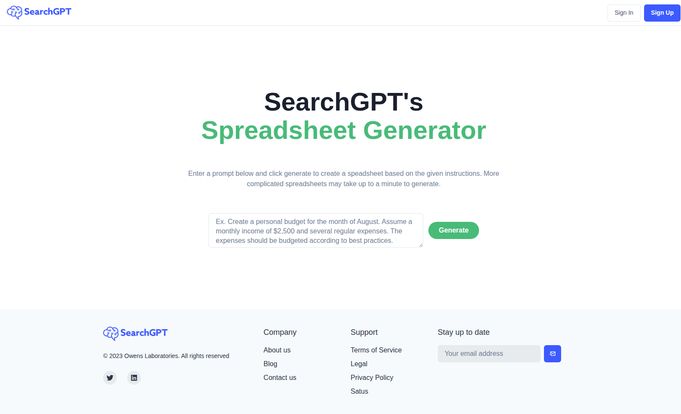
Think of it like this: instead of meticulously building your house brick by brick (or cell by cell), you just tell an architect, “I want a three-bedroom house with a big kitchen and lots of natural light,” and they hand you the blueprints. That’s SearchGPT for spreadsheets. The example on their homepage is pretty clear: “Create a personal budget for the month of August. Assume a monthly income of $2,500 and several regular expenses. The expenses should be budgeted according to best practices.”
It’s a bold claim in a world flooded with AI tools that often overpromise and underdeliver. But the idea of automating one of the most tedious parts of my job—setting up tracking sheets for keyword rankings, content calendars, and campaign budgets—was too good to ignore.
My First Spin with the AI Spreadsheet Generator
The interface is refreshingly minimalist. There are no bells and whistles, no distracting menus. Just a text box and a “Generate” button. I decided to give the default prompt a try, word for word. I hit generate, and... well, I waited. For about 15 seconds, a little loading icon did its thing. I was half-expecting an error or a jumbled mess.
What I got was surprisingly competent. A fully-formed budget spreadsheet popped up, complete with columns for Income, Budgeted Amount, Actual Amount, and Difference. It had pre-filled categories like Rent/Mortgage, Utilities, Groceries, Transportation, and even sections for Savings and Debt Repayment. It wasn’t just a blank template; the AI had understood “best practices” and created a logical structure. Impressive.
The Things I Absolutely Loved
The immediate upside is speed. Creating that budget sheet manually would have taken me a good 10-15 minutes of thinking, clicking, and typing. SearchGPT did it in seconds. This is a massive time-saver, especially for repetitive tasks. Need a simple project tracker every time a new client comes on board? Just type it out. Need a quick content calendar for next month? Done.
It’s also a fantastic cure for “blank page syndrome.” Sometimes, the hardest part is just starting. SearchGPT gives you a solid foundation to build upon. Maybe you don’t love the exact categories it chose for your budget, but now you have a structure to tweak, not a blank canvas to build from the ground up. It’s like getting a starter dough for a pizza—the base is ready, and you can just focus on adding the toppings you like.
A Few Bumps in the Road
Of course, it’s not perfect. The tool itself warns that more complicated spreadsheets can take up to a minute to generate. In my tests, a more complex request like “Create a detailed SEO campaign tracker for a new client, including columns for target keywords, monthly search volume, current rank, target URL, content status, backlink outreach, and DA” did take closer to 45 seconds. It's not a deal-breaker, but in our instant-gratification world, it feels like a bit of a wait.
The bigger limitation, for now, is that it only does spreadsheets. The folks at SearchGPT say they plan to expand into other AI services, which is exciting, but right now, it’s a one-trick pony. A very useful pony, but a pony nonetheless. Also, while I was poking around the site, trying to find a pricing page or a more detailed blog, I hit a 404 error page. It's a small thing, but it tells me this is still a new product, a work in progress. They're probably moving fast and building things out, which is common for a startup.
Who Should Be Using SearchGPT Right Now?
This tool isn’t going to replace the power-user data scientist who lives and breathes complex macros and pivot tables. Not yet, anyway. But for a huge chunk of people, this is incredibly useful. I'm thinking of:
- Small Business Owners: Quickly create inventory trackers, sales logs, or employee schedules without needing a dedicated admin.
- Students: Generate study schedules, project planners, or research logs in a snap.
- Marketers & SEOs: Like me! Whip up basic content calendars, keyword trackers, or social media schedules to get a project rolling.
- Project Managers: Get a head start on Gantt chart-style timelines or task lists.
- Anyone who hates spreadsheets: Honestly, if you dread opening Excel or Google Sheets, this could be your new best friend. It removes the initial barrier to entry.
The Big Question: How Much Does SearchGPT Cost?
Here's the interesting part. I couldn't find a pricing page anywhere. As of this writing, SearchGPT appears to be completely free to use. My guess? They're in a public beta or growth phase, trying to get as many users as possible to test and refine the AI. This is a classic playbook for new SaaS tools.
Will it stay free forever? Probably not. I'd wager they'll eventually introduce a freemium model with limits on the free tier or a paid plan for more advanced features. So my advice is to get in there and use it now while the getting is good. It’s a great chance to see if it fits your workflow without any commitment.
A Glimpse into the Future
SearchGPT has stated its intention to offer more AI services in the future. This is where my mind starts to race. Imagine typing, “Take the data from this spreadsheet and create a five-slide presentation summarizing the key trends.” Or, “Analyze this sales data and tell me which product is underperforming.” If the spreadsheet generator is just their opening act, the main event could be something truly transformative for how we interact with our data.
If they can nail the natural language interface for other common business tasks, Owens Laboratories could be sitting on something big. It's definitely a space I'll be watching.
Frequently Asked Questions about SearchGPT
What is SearchGPT in simple terms?
SearchGPT is an AI tool that creates spreadsheets for you. You just type a description of the spreadsheet you need (like “a weekly meal planner” or “a simple sales tracker”), and the AI builds it for you automatically.
How does SearchGPT actually work?
It uses artificial intelligence, specifically natural language processing (NLP), to understand your text prompt. The AI then interprets your request and generates the rows, columns, and headers of a spreadsheet that matches your description, which you can then use or download.
Is SearchGPT free to use?
Currently, yes. As of late 2023, the tool appears to be completely free. There is no pricing information on their website, which suggests they are in an introductory or beta phase. This could change in the future.
What kind of spreadsheets can it make?
It excels at creating structured, template-style spreadsheets. Think budgets, planners, trackers, logs, and simple project management sheets. While it can handle some complexity, it’s best for getting the foundational structure of a spreadsheet built quickly.
Can SearchGPT replace Microsoft Excel or Google Sheets?
No, not at all. It's not a spreadsheet program itself; it's a spreadsheet generator. It doesn’t have the powerful calculation, charting, or collaborative features of giants like Excel or Google Sheets. Think of SearchGPT as a powerful assistant that sets the table for you; you still need Excel or Sheets to actually eat the meal.
Is my data safe when I enter a prompt?
This is a valid concern with any AI tool. You're sending your text prompt to their servers. For sensitive business or personal information, it’s always best practice to review the company’s Privacy Policy and Terms of Service. For now, I'd recommend using it for general structure generation rather than inputting confidential data directly into the prompt.
Final Thoughts: A Promising Start
So, is SearchGPT a gimmick or a game-changer? Right now, it's somewhere in the middle, and that's not a bad thing. It's a genuinely useful tool that solves a real, nagging problem for a lot of people. It’s not going to take over the world of data analytics, but it will save you time and mental energy on tedious setup tasks.
It’s a simple, elegant solution that I’ve already bookmarked. For a tool that’s still in its early stages (and is currently free), the value is undeniable. It's a fantastic starting point, a brilliant little productivity hack, and a promising glimpse of a future where we spend less time fighting with our software and more time getting things done. Give it a shot; what have you got to lose?
Reference and Sources
- SearchGPT Official Website: https://searchgpt.chat