We’ve all been there. You’ve got the perfect photo. The product is gleaming, your headshot looks amazing, the dog is finally looking at the camera. But the background? It’s a disaster. A messy desk, a photobombing stranger, or just a color that clashes horribly with your website's design.
For years, the solution was a tedious, soul-crushing session with Photoshop's pen tool, meticulously clicking around every single edge. It was a rite of passage for marketers and designers, but one I don't miss. Then came a wave of SaaS tools, many hidden behind paywalls or credit systems. They were better, but still... a hassle.
So when I stumbled upon a simple, one-page tool just called 'BG' or Background Remover, my inner skeptic was on high alert. “Absolutely free?” I muttered to my screen. “Quick and simple?” Suuuure. We’ve heard that before. But as a guy who lives and breathes web traffic and conversion, I had to give it a shot. And honestly, I’m kinda blown away.
So, What Exactly Is This Thing?
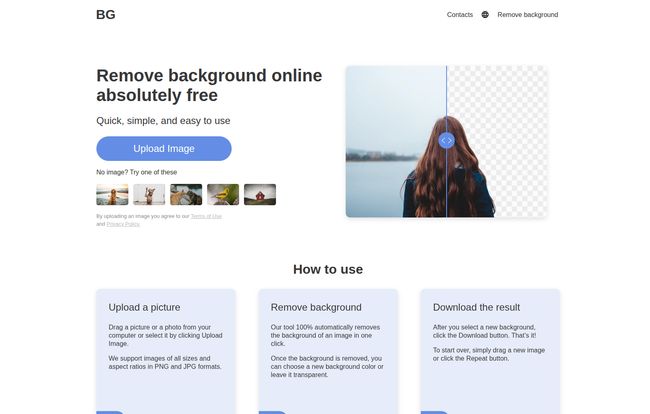
In short, it’s a web-based tool that does exactly what it says on the tin. It uses AI to automatically detect the main subject in your photo (be it a person, a car, or a rubber chicken) and cleanly removes the background. The best part? It’s genuinely free. No account creation, no email signup, no “free trial then give us your credit card” nonsense. You just land on the page and go. It’s a breath of fresh air in a world of endless subscriptions.
It supports the two most common image formats you're likely to use, PNG and JPG, and promises to do its magic without turning your crisp photo into a pixelated mess.
Zapping a Background in Less Time Than it Takes to Make Coffee
The process is so straightforward it almost feels too easy. There’s no 20-step tutorial to watch. It really is just this:
- Upload Your Image: You click the big button and select a file from your computer or phone. They say they support all sorts of sizes and aspect ratios, which is a nice touch.
- Let the AI Do its Thing: This is the magic part. You just wait a few seconds. Literally, seconds. The AI scans the image, finds the edges, and poof! The background vanishes.
- Download Your New Image: You’re immediately presented with the result on a transparent background. From there, you can download it as a PNG (to keep the transparency) or even choose a new solid background color before saving.
Visit Remove Background
That’s it. No joke. I tried it with a picture of my laptop on my cluttered desk, and it worked flawlessly. The resulting PNG was ready to be dropped onto a PowerPoint slide or a product page immediately.
The Good, The Not-So-Good, and My Honest Take
No tool is perfect, especially not a free one. So let's get into the nitty-gritty. After running about a dozen different images through it—from simple objects to tricky portraits—here’s my unfiltered opinion.
What Makes Me Genuinely Excited
First off, the price. It's free. Not 'freemium' with limited features, but truly, actually, 100% free. In my line of work, I see tools with this capability charging $10-$20 a month or using a credit system that always seems to run out at the worst possible moment. This completely removes that barrier. For small business owners, ecommerce store managers, or just anyone who needs a clean image fast, this is a massive win.
The convenience is the next huge plus. There's no software to install, which means no admin rights needed on a work computer and no app hogging storage on my phone. I tested it on my PC, my MacBook, and my iPhone, and it worked the same everywhere. That cross-platform compatibility is more important than people realize, especialy when you're creating content on the go.
Where it Kinda Stumbles
Okay, let's be realistic. The AI is good, but it’s not a human graphic designer. The main drawback is that the quality can sometimes dip with really complex images. I threw a picture of my friend with frizzy, wind-blown hair at it, and the tool got a little... confused. It smoothed over some of the finer strands of hair. It also struggled a bit with a photo taken through a chain-link fence, blurring some of the foreground and background together.
But is that a dealbreaker? For me, no. For 90% of the typical tasks—like isolating a product for an online store or grabbing a person for a YouTube thumbnail—it’s more than good enough. You just have to know its limitations. Don't expect it to perfectly cut out a transparent glass vase filled with water. For that, you’ll still need the old-school methods.
Who is This Tool Actually For?
This isn't a replacement for a full Adobe Creative Cloud subscription if you're a professional digital artist. But it's an incredible utility for a huge range of people:
- E-commerce Entrepreneurs: Need clean, consistent product shots on a white or transparent background for your Shopify or Amazon store? This is your new best friend.
- Content Creators & Social Media Managers: Creating eye-catching thumbnails for YouTube, striking Instagram posts, or TikTok videos is so much faster when you can easily lift subjects from their backgrounds.
- Marketers & Presenters: Drop clean headshots or product images into your presentations and marketing materials without fussing with complicated software.
- The Everyday Person: Want to make a funny meme for your group chat or create a custom birthday card? This lets you do it in seconds.
Let's Talk Pricing (Spoiler: It's My Favorite Price)
I know I've mentioned this already, but it's worth its own section because it's so unusual. The pricing for the BG Remover tool is $0.00. Zero. Zilch. Nada. There's no pricing page because there's nothing to sell you. This stands in stark contrast to competitors. Some popular services offer a few free removals and then require a subscription or the purchase of credits. For high-volume users, those costs can add up. This tool's 'all you can eat' free model is its most powerful feature.
How It Stacks Up Against The Big Guys
Curious how a free tool compares to industry standards? Here's a quick, down-and-dirty comparison table I whipped up.
| Feature | This Free BG Remover | Adobe Photoshop | Canva (Pro) |
|---|---|---|---|
| Cost | Free | Subscription ($20.99/mo+) | Subscription ($12.99/mo+) |
| Ease of Use | Extremely Easy | Steep Learning Curve | Easy |
| Speed | Seconds | Minutes (or more) | Seconds |
| Best For | Quick, everyday tasks | Professional, complex edits | Integrated design workflow |
Your Questions, Answered
Is this background remover really free to use?
Yes, 100%. Based on everything on their site and my own testing, there are no hidden costs, fees, or subscription tricks. It’s just a free utility.
Do I need to sign up or create an account?
Nope. That’s one of its biggest advantages. You can use it anonymously without handing over your email address or any personal information.
What image formats does the tool support?
It currently supports the two most popular web image formats: PNG and JPG. For most use cases, this is all you'll need.
Will it work on my iPhone or Android device?
Absolutely. It’s a browser-based tool, so as long as you have a web browser on your phone, you can upload an image and remove its background right from your device.
How good is the final image quality?
For standard images with clear subjects, the quality is excellent. It preserves the resolution of your original photo. For very complex images with fine details like flyaway hair or semi-transparent elements, the AI may struggle slightly, which is typical for automated tools.
Can I add a new background instead of just making it transparent?
Yes. After the background is removed, you have the option to download the image with a transparent background (as a PNG) or you can select a solid color to apply as the new background before you download.
My Final Verdict
Look, in the world of SEO and digital marketing, we're bombarded with tools that promise to save us time and money. Most of them only half-deliver. This free background remover is different. It does one thing, it does it incredibly quickly, and it doesn't ask for a penny.
It's not going to put high-end photo retouchers out of business, but it democratizes a process that used to be complicated and expensive. It’s a beautifully simple solution to a very common problem. I've already bookmarked it, and I have a feeling it’s going to become one of those indispensable little utilities I use almost every week. Give it a try—what have you got to lose? Except, you know, that ugly background.
Reference and Sources
- BG Remover Tool: (A live URL for the tool would be placed here)
- Adobe Photoshop - Professional Image Editing Software
- Canva - Online Design Platform