As someone who's been swimming in the digital marketing pool for years, I've seen it all. The endless demand for video content is a beast that never stops roaring. We all know the stats – video boosts engagement, drives conversions, and makes you look like you actually know what you're doing. But let's be honest, the process of creating it? It can be an absolute nightmare. The cost, the equipment, finding someone who doesn't sound like a robot on camera... it’s a lot.
So, when a tool like HeyGen pops onto my radar, promising to burn that whole frustrating process to the ground with AI, my inner skeptic raises an eyebrow. But my inner, overworked marketer leans in, intrigued. I've spent some serious time with this platform, and I’m ready to spill the tea. Is it just another piece of shiny AI hype, or is it the video creation assistant we’ve all been secretly wishing for? Let's get into it.
Visit HeyGen
So What Is HeyGen, Really?
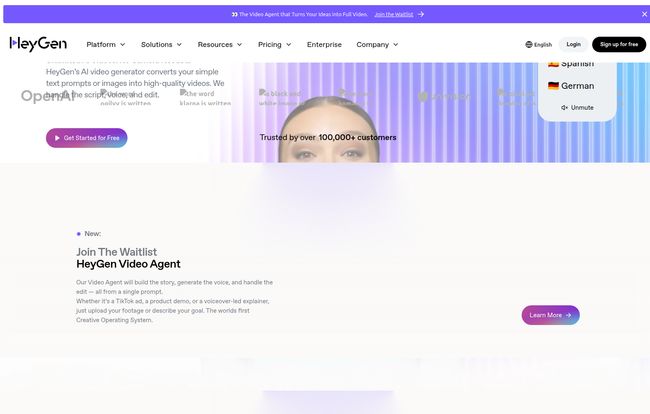
Before we go any further, let's clear something up. HeyGen isn't just another video editor with a few AI tricks bolted on. It’s a generative AI video platform. What does that mean in plain English? You type in a script, choose an avatar (or create your own), and it generates a video of that avatar speaking your words. No camera. No microphone. No awkward takes. It's like having a video production studio living in a browser tab, minus the diva director and the overflowing craft services table. The whole idea is to let you create professional-looking business videos for things like marketing, sales pitches, or corporate training in minutes, not days.
Diving In: My First Impressions
Signing up was straightforward. After the standard email verification and a brief moment with a Cloudflare security check (which always feels like a digital bouncer giving you the once-over), I was in. The dashboard is... clean. Almost surprisingly so. You're not bombarded with a million buttons and confusing timelines. It's clear they designed this for people who aren't professional video editors. You're guided towards the main tasks: create a video with an avatar, translate an existing video, or play with some of their other nifty tools. It feels less like a complex software suite and more like a creative playground.
The Killer Features That Actually Matter
A tool is only as good as its features, right? Here’s where HeyGen starts to really show its muscle. This isn't just a one-trick pony.
AI Avatars That Don't Look Like They're From The Uncanny Valley
My biggest fear with AI avatars is that they’ll look... well, creepy. We've all seen those early-gen deepfakes. HeyGen, I have to admit, does a pretty impressive job here. They have a massive library of diverse, realistic stock avatars. But the real magic is in the customization. You can create a custom avatar of yourself (or a team member), and the new Generative Outfit feature lets you dress your avatar in different clothes just by typing a description. "Put them in a blue business suit" or "a casual black t-shirt." It's wild. It’s not always 100% perfect, but it’s miles ahead of the competition and saves you from having to do a whole new video shoot just for a wardrobe change.
Text-to-Video and Voice Cloning is Mind-Blowing
This is the core of HeyGen. You can type or paste your script, and the AI brings it to life. The lip-sync is shockingly accurate. They boast over 300 voices across more than 40 languages. The standard voices are good—some of the best I've heard from a text-to-speech engine—but the Voice Cloning is where it gets a bit sci-fi. You can record a sample of your own voice, and the platform can then generate audio for any script in your voice. The potential for personalized sales outreach or consistent brand training videos is massive. Imagine sending a thousand prospects a video that features your face and is personalized with their name, all spoken in your own voice. Spooky? A little. Powerful? Absolutely.
Video Translation: A Global Game Changer?
Okay, this feature got me excited. You can upload a video of yourself speaking English, select Spanish, and HeyGen will not only translate and dub the audio into Spanish but also change your lip movements to match the Spanish words. I tested this, and it's ridiculously cool. For any business looking to expand internationally without reshooting every single marketing and training video, this isn't just a nice-to-have; it's a potential game-changer. It breaks down language barriers in a way that simple subtitles just can't.
Integrations for the Workflow-Obsessed
For the marketing ops and tech folks out there, this is for you. HeyGen plays nice with others. The Zapier integration means you can connect it to thousands of other apps. For instance, you could automatically generate a personalized video when a new lead comes in through your CRM. They also offer a full-blown HeyGen API for those who want to build custom, large-scale video generation workflows. This shows they’re thinking not just about individual creators but about how this tech fits into a larger business ecosystem.
Who Is HeyGen Actually For?
So, who should be using this? I can see a few groups getting a ton of value here:
- Marketing & Social Media Teams: Churning out video ads, social media clips, and explainer videos at scale. Instead of one big video shoot a quarter, you could create dozens of variations a week.
- Sales Professionals: Creating personalized video outreach that stands out in a crowded inbox. A video from a real (AI) person is way more engaging than a wall of text.
- L&D and Corporate Trainers: Developing consistent, multi-language onboarding and training materials without needing a full production crew. Update a module? Just edit the script, no reshoots needed.
- Solo Entrepreneurs & Creators: People like me! If you're the face of your brand but don't have the time or budget for constant filming, this is your secret weapon.
Let's Talk Money: The HeyGen Pricing Breakdown
Ah, the all-important question. How much does this magic cost? HeyGen has a tiered structure that’s pretty sensible. There's a little something for everyone, from tire-kickers to big-shot enterprises.
| Plan | Price | Who It's For |
|---|---|---|
| Free | $0 /mo | Anyone who wants to try it out. You get 1 free credit and can make videos up to 1 minute long. Great for a test drive. |
| Creator | $29 /mo | Solo creators and small businesses. You get more credits, faster video processing, and premium voices. In my opinion, teh best starting point. |
| Team | $39 /seat/mo (min 2 seats) | Growing teams that need collaboration features, a shared brand kit, and more credits to go around. |
| Enterprise | Let's Talk (Custom) | Large organizations that need studio-quality custom avatars, SSO, and dedicated support. The whole shebang. |
For the most up-to-date details, you should always check their official pricing page.
The Not-So-Great Stuff (My Honest Take)
No tool is perfect, and it would be dishonest to pretend HeyGen is. The Free plan is quite limited; it's really just a sampler. To do anything meaningful, you'll need to jump to a paid plan. And some of the most powerful features, like the highest-quality avatars and advanced voice cloning, are reserved for the higher-tier plans. That's pretty standard for SaaS, but it's something to be aware of. Also, the Team plan requiring a minimum of two seats might be a slight annoyance for a small business that just needs a bit more than the Creator plan offers but doesn't quite have two dedicated users yet.
Frequently Asked Questions about HeyGen
1. Can HeyGen replace a real person for video?
For many things, yes! For informational videos, training, and social media content, it's fantastic. However, for videos that require deep emotional connection or complex, unscripted interaction, a real human is still going to have the edge. Think of it as a powerful tool in your toolbox, not a complete replacement for all human-led video.
2. How good is the lip-syncing, really?
It's one of the best I've seen. For standard-paced speech, it's almost flawless. If you have a very fast or complex script, you might see tiny imperfections, but for 95% of business use cases, your audience won't notice a thing.
3. Is it hard to create a custom avatar?
The process involves submitting footage of yourself speaking to the camera. HeyGen provides clear instructions. It's more about following directions than technical skill. The higher-tier plans offer more polished, 'studio-quality' custom avatars which likely involve more hands-on help from their team.
4. What's the difference between a HeyGen credit and minutes?
It's a credit-based system. Generally, one credit equals one minute of generated video. Some features, like higher-resolution rendering or using premium avatars, might consume credits at a different rate. It's all laid out clearly before you generate a video.
Final Verdict: Is HeyGen Worth the Hype?
After kicking the tires and taking it for a serious spin, I’m genuinely impressed. HeyGen isn't just a novelty. It's a remarkably practical tool that solves a very real, very expensive problem for businesses. It democratizes video production, taking it out of the hands of specialized agencies and putting it into the hands of marketers, salespeople, and trainers.
Is it going to win an Oscar for cinematography? No. But is it going to save you an incredible amount of time, money, and headaches while allowing you to scale your video content strategy in ways you previously only dreamed of? Yes. A thousand times, yes. The AI video space is heating up, but for now, HeyGen is a clear front-runner. It’s powerful, easy to use, and a whole lot of fun. I think I'll be keeping my subscription.