Let’s have a little chat. You, me, and the shared trauma of deploying a simple app to the cloud. You know the story. It starts with optimism. “This’ll be quick,” you tell yourself. “Just a Docker image, how hard can it be?”
Fast forward 21.4 hours—a number that feels oddly specific and painfully real because, as the creator of a new tool called Deploud points out, it was his actual time lost. Mine was probably closer to 30 hours last month, but who’s counting? You’re drowning in a sea of browser tabs filled with fragmented, often outdated, documentation. You’re fighting cryptic error messages that feel like personal attacks from the cloud provider. Something about an API not being enabled, or an 'exec format error' that sends you down a Stack Overflow rabbit hole from 2017.
And permissions. Oh, the permissions. Trying to set up the right IAM roles with the absolute minimum permissions is a special kind of purgatory. It’s like being a bomb disposal expert, except you’re blindfolded and the wires are all the same color.
I've been there. You've been there. We've all been there. It’s the Sisyphean task of the modern developer. We just want to deploy our code. That's it. That’s why when I stumbled upon Deploud, my curiosity was definitely piqued.
So What Is Deploud, Actually?
At first glance, you might lump it in with other platforms that promise one-click deployments. But that’s not quite right. Deploud is different. It’s not another abstraction layer that you’re locked into. It's not a black box.
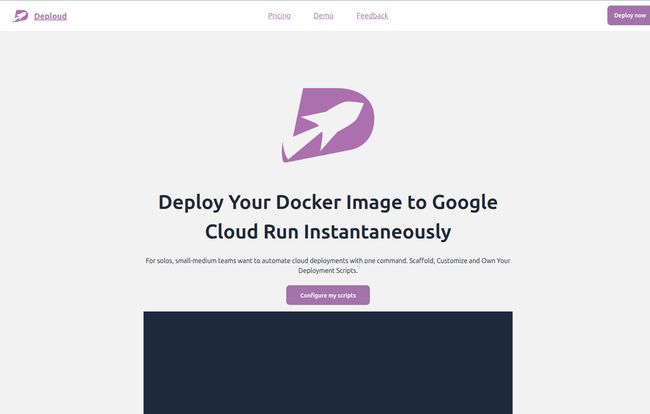
Instead, Deploud acts as a super-intelligent scaffolding crew for your cloud project. It generates a set of verified deployment scripts for you. Specifically, it uses Pulumi to generate Infrastructure as Code (IaC) that you own. You get the actual code. You can see it, touch it, modify it, and understand it. It sets up the project, configures the service accounts with those pesky minimal permissions, and spits out the code to make it all happen.
Currently, it's focused on Google Cloud Run, but the roadmap shows AWS Lambda and Azure Functions are on the way. The goal is simple: automate the painful, repetitive, error-prone setup so you can get back to what you're actually paid to do—write code that delivers value.
Visit Deploud
Cutting Through the Deployment Noise
Let's get specific about the headaches this thing aims to cure. It’s not just about saving time; it's about saving sanity.
The Documentation Labyrinth
Google, Amazon, Microsoft... I have a love-hate relationship with their docs. They are incredibly comprehensive, which also means they're a sprawling labyrinth. Finding the right page for your specific use case, and then ensuring it's not from three versions ago, is a real skill. Deploud essentially does the reading for you, generating a script based on what works right now.
Fighting Obscure and Obtuse Errors
Nothing grinds a project to a halt faster than a nonsensical error. The infamous “Cloud Run API has not been used in project…” error is a rite of passage for GCP users. You then spend an hour figuring out which of the 500 APIs you need to enable. Deploud handles this by generating scripts that correctly set up the prerequisites, preventing these kinds of errors before they even happen.
Full Control Without the Lock-In
This is the part that really got my attention. I’m naturally skeptical of platforms that “simplify” the cloud because it often means you’re stuck with them forever. You hit an edge case their platform doesn’t support, and you’re toast. With Deploud, that's not a problem. Since it just generates the Pulumi code for you, you have a perfect “escape hatch.” If you outgrow the initial script, you just modify the code. It’s yours. No lock-in. That’s a huge deal.
How It Works in Practice
The process looks ridiculously simple, almost too simple. You go to their site, configure a few basic things for your project, and it gives you a .zip file. Inside, you find a few key files and folders: a `cli` directory, some `bash` scripts (`gen.bash`, `del.bash`), and a `pulumi` folder.
The workflow is basically:
- Run
bash gen.bash. This script does the heavy lifting: installs the necessary CLI tools (if you dont have them), configures permissions in your cloud account, and scaffolds the Pulumi code. - Navigate into the `pulumi` folder and run
pulumi up. - That’s… pretty much it. Your app should be deployed.
It’s also idempotent, which is a fancy way of saying you can run the script over and over, and it won’t create duplicate resources. It just ensures the state matches what’s in the code. Mess something up? Just run it again.
The Good, The Bad, and The Bash-Required
No tool is perfect, right? Let’s break it down.
What I Really Like
- Genuine Time Savings: This is the core promise, and it delivers. It shaves off hours, maybe even days, of setup and troubleshooting time.
- You Own The Code: I'm saying it again because it's important. It's not a black box. It’s a code generator, a template engine on steroids. This builds trust and ensures flexibility.
- Best Practices by Default: Setting up service accounts with minimal permissions is a security best practice that is often overlooked in the rush to just get something working. Deploud bakes this in from the start.
- Idempotency: Knowing you can re-run a script without making a mess is a huge confidence booster.
A Few Things to Keep in Mind
Now, for the reality check. Deploud is still young and has its limitations. It’s not a magic wand for every situation.
- Platform Focus: Right now, it’s primarily for Google Cloud. If your stack is 100% AWS or Azure, you’ll have to wait. But they are listed as 'coming soon', so keep an eye out.
- System Requirements: You need a bash-supported environment. That means MacOS, Linux, or for Windows users, the Windows Subsystem for Linux (WSL). This is pretty standard for most developers these days, but it’s a prerequisite.
- External Tool Dependencies: This isn't a standalone binary. It relies on you having (or it installing) tools like the `gcloud` CLI, `docker`, `pulumi`, and `golang`. It orchestrates these tools for you, but it doesnt replace them.
Okay, What's the Catch? The Pricing
This is often where these cool new tools fall apart, with confusing subscription tiers and enterprise-level pricing. Deploud’s approach is… refreshing.
| Plan | Price | Features |
|---|---|---|
| Free | $0 | Includes the verified script, project creation, service account setup, Pulumi code scaffolding, idempotency, and a single staging environment. |
| Paid | $49.99 (one-time) | Everything in the free plan plus environment variable setup, both staging and production environments, unlimited service selection, setup support, a private Discord channel invite, and creation of a CI pipeline. |
Yes, you read that right. The paid tier is a one-time fee. In a world dominated by monthly subscriptions, this feels like a breath of fresh air. For less than the price of a nice dinner, you get a perpetually useful tool that saves you hours of work. The free tier is also incredibly generous, offering more than enough to get a project off the ground.
So, Who Is This For?
I see Deploud as a perfect fit for a few key groups:
- Solo Developers and Indie Hackers: When you're a one-person show, your time is your most valuable asset. Spending a day on deployment is a day you're not building your product. This is a massive productivity booster.
- Small to Medium Teams: For teams that don't have a dedicated DevOps engineer, Deploud can standardize deployments and implement best practices without a steep learning curve.
- Frontend Devs Dabling in Backend: If you're a developer who is less comfortable with the infrastructure side of things, this provides a safe and effective on-ramp to deploying your own services.
Who isn't it for? Massive enterprises with established, complex DevOps workflows and dedicated platform engineering teams probably have their own bespoke tooling. But for the 90% of us who don't, this hits a real sweet spot.
Honestly, Deploud feels less like a product and more like a shared set of battle-tested notes from a senior developer who’s been through the cloud deployment wars and came out the other side. It doesn't try to hide the complexity of the cloud; it just tames it for you, packages it up, and hands you the reins.
It’s an accelerator, not a crutch. And in my book, that makes it a tool worth paying attention to. It lets you get back to the work that matters, and maybe, just maybe, lets you keep a little bit of your sanity in the process.
Frequently Asked Questions
How is this different from just using Pulumi or Terraform directly?
Think of Deploud as a kickstarter for your Pulumi/Terraform project. While you can write the IaC yourself from scratch, Deploud generates a verified, best-practice script for you. It handles the initial project setup, permissions, and boilerplate code that can take hours to get right. You're still using Pulumi, but you're starting on third base.
With AI tools like ChatGPT, isn't this obsolete?
It's a fair question! While you can ask an AI to write a deployment script, the results can be inconsistent, use outdated methods, or have security flaws (like overly permissive roles). The scripts from Deploud are verified and tested to work with current cloud provider APIs and follow security best practices, saving you the debugging and verification step.
Is the paid plan really a one-time fee?
Yes. According to their pricing page, the $49.99 paid tier is a one-time purchase, not a recurring subscription. This gives you access to the advanced features for your projects permanently.
What cloud providers are currently supported?
As of now, the primary focus is on Google Cloud (specifically Cloud Run). However, support for AWS Lambda and Azure Functions is listed as being in development.
What are the system requirements to use Deploud?
You need a command line that supports bash. This includes MacOS, any Linux distribution, and Windows via the Windows Subsystem for Linux (WSL). You will also need the relevant cloud CLI tools for the provider you are targeting.
Is there a refund policy?
The website's FAQ section would be the best place to check for the most current refund policy details, as this can change. Given the generous free tier, you can thoroughly test the core functionality before deciding to purchase.